How Multica works
Multica records and coordinates the work; connected computers execute it.
When you assign an issue to an agent, Multica creates a run that a runtime on a connected computer claims. The runtime invokes a local AI coding tool and writes progress and results back to the original issue.
The full path of a run
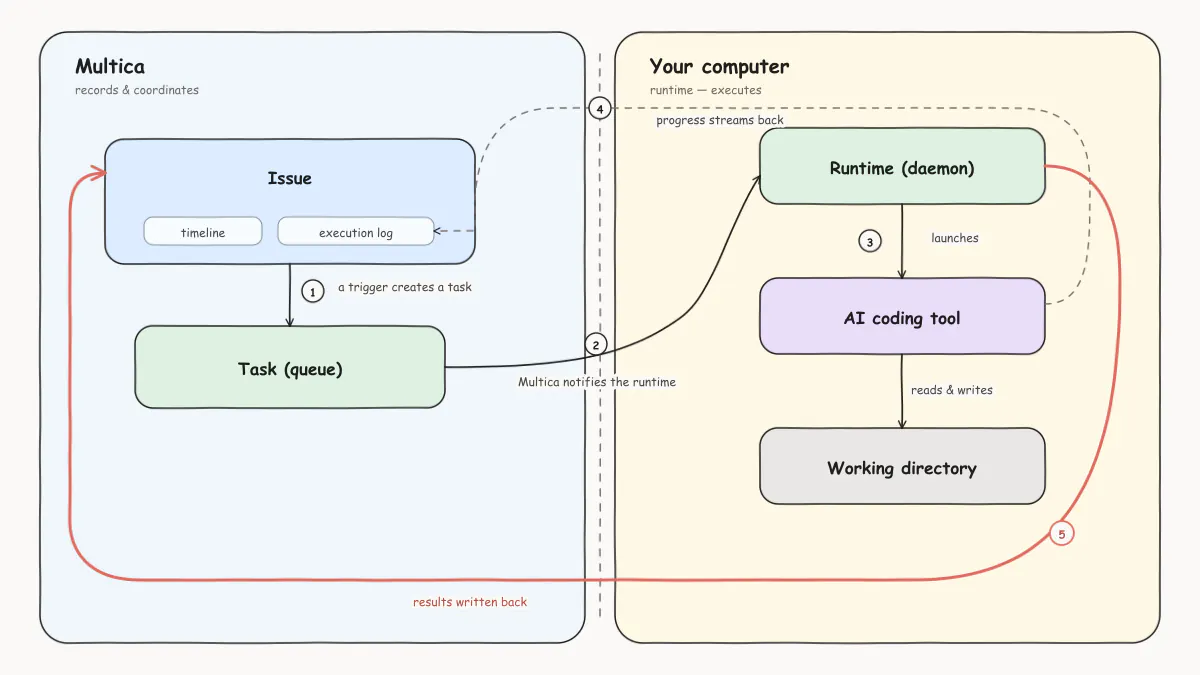
- The issue provides the context. The issue holds the work description, the discussion, and the assignee. When it is assigned to an agent, the system uses that agent's instructions, model, skills, and runtime configuration.
- Multica creates a run. The run enters the queue; if no runtime is online, it waits there.
- A runtime claims the run. An online runtime on a connected computer claims the run and invokes the AI coding tool the agent is configured to use.
- The AI coding tool executes locally. The tool reads the working directory, runs commands, and produces results.
- Results are written back to the issue. Progress, comments, and results appear in the issue's timeline and execution log.
For the full list of issues, agents, runs, and runtimes and how they relate, see Core concepts.
The data and execution boundary
| Multica | Connected computer |
|---|---|
| Workspaces, issues, comments, and statuses | AI coding tools and their credentials |
| Agent configuration and skills | Code directories and local files |
| Run status, records, and results | Actual file changes and command execution |
This boundary is the same on Multica Cloud and in self-hosted deployments.
One exception: anything saved to an agent's custom_env is stored on the Multica server and passed to the runtime at execution time. Do not put secrets in custom_env that must never leave your computer.
How agents are triggered
Agents never start work on their own — every run is triggered by an explicit action: assigning an issue, @-mentioning the agent in a comment, chatting with it directly, or an Autopilot. For how to choose between the four and the rules they share, see Put agents to work.
Run completion and issue completion
When the execution log shows Completed, it only means that one run has ended. The issue can still take further discussion, added requirements, or another agent trigger. Whether the issue is done depends on the actual progress of the work and its status.
Next steps
- Daemon and runtimes — how computers connect to Multica, and what happens when runtimes go online or offline.
- Runs — run statuses, retries, and cancellation rules.
- Assign issues to agents — the most common way to collaborate.