Daemon and runtimes
How Multica connects computers, discovers AI coding tools, and executes runs.
Multica records and coordinates the work; connected computers execute it. The daemon on a computer claims runs and invokes the AI coding tools installed on that machine.
Qoder Cloud Agents remote runtime
Qoder Cloud Agents runs assigned issues through remote QCA sessions. The Multica server supervises a bridge that uses the existing daemon task protocol; no user-operated local daemon is needed for this runtime.
Before you start
- You need to be a workspace administrator. Each workspace has one Qoder connection.
- In Qoder, create a personal access token (PAT), at least one environment, and the QCA Agents you want to use. Models, tools, and skills are configured on the QCA Agent in Qoder, not in Multica.
- Self-hosted installations must set
MULTICA_VCS_SECRET_KEYon the server: a base64-encoded 32-byte key that stays the same across restarts. Without it, Qoder Cloud Agents does not appear in the Add menu.
Connect Qoder
- On the Runtimes page, click Add and choose Qoder Cloud Agents under Cloud services.
- Under Region, pick the site that issued your PAT: Global (qoder.com) or China (qoder.com.cn). A PAT only works in its own region; if it is rejected, use the button that retries on the other site.
- Paste the PAT into Personal access token. Once it is verified, the Environment list loads from Qoder. A single environment is selected automatically; otherwise choose one.
- Optional: open GitHub authorization and add a repository URL and token for each repository agents may clone. Agents can only clone repositories authorized here.
- Optional: open Execution to set concurrent runs (default 3, up to 10) and the run timeout (default 60 minutes, from 5 to 240).
- Click Connect. Qoder Cloud Agents appears in the cloud section of the Runtimes page and comes online within a few seconds.
Add an agent
Open Qoder Cloud Agents from the Runtimes page and click Create an agent with it, or create an agent as usual and choose the Qoder runtime. In the agent form, select the remote agent under QCA Agent. For an existing agent, change the QCA Agent or its default repository in the agent's Routing tab. Several Multica agents can share one connection, each linked to a different QCA Agent.
Connection credentials are encrypted and shared within the workspace. Administrators manage the connection; members can select accessible QCA agents. Projects choose the repository and starting branch; the repository's token is passed to QCA when a coding session is created. PAT values are never returned to the browser after saving.
On the Qoder Cloud Agents page, administrators can edit the connection and repositories, Pause to stop sending new tasks while keeping credentials and agents, or Disconnect to delete the saved tokens, remove the runtime, and unbind its agents.
How runs work
Runs beyond the concurrency limit wait in the queue. A follow-up on the same issue continues the agent's previous Qoder session when it is idle. An agent can set a default repository, used when the issue's project has none. The agent is asked to push a branch named after the issue identifier and to prefix the pull request title with it, so the pull request is linked to the issue.
This first version supports issue runs, progress reporting, cancellation, and recovery from a persisted run journal. Configure models, tools, and skills in Qoder. Interactive chat, local directories, attachments, and creating remote QCA agents from Multica are not supported. The Runtimes page separates remote runtimes from connected computers.
For standalone bridge setup and operational limitations, see the Qoder runtime README.
Daemon vs runtime
- The daemon is the Multica background process running on one computer. It connects to the server, discovers local tools, claims runs, and reports results back.
- A runtime represents one concrete execution environment available to a workspace. It corresponds to one computer plus one AI coding tool — or one custom runtime profile — on that computer.
For example, a computer has both Claude Code and Codex installed and is connected to two workspaces. The daemon registers Claude Code and Codex runtimes for each workspace. Restarting the daemon updates the existing records; it does not keep creating new runtimes for the same combination.
Execution location and data boundaries
The AI coding tools a local runtime invokes, those tools' own login credentials, and your local code directories all stay on the connected computer. The Multica server does not execute commands on behalf of local tools, and it does not automatically upload your entire working directory.
So the team can collaborate, the server stores issues, comments, agent configuration, run context, run records, and the results agents write back. That content can include code snippets or other project context an agent chose to read and include in its replies.
An agent's custom environment variables are stored server-side and sent to the runtime at execution time. Do not read "local execution" as "every secret exists only on this machine": custom environment variables and MCP configuration live on the server, and their display is limited by the sensitive-value rules.
Starting the daemon
With Multica Desktop, the app starts the daemon automatically — no extra command needed.
On the web, a remote computer, or a headless environment, install the Multica CLI first, then run:
multica daemon startThe daemon runs in the background by default. Common commands:
| Command | Purpose |
|---|---|
multica daemon status | Show daemon and connection status |
multica daemon logs -f | Follow the logs |
multica daemon restart | Restart the daemon and re-detect local tools |
multica daemon stop | Stop the daemon |
multica daemon start --foreground | Run in the current terminal, for debugging |
To place run workspaces on another disk, persist a root for the current profile with multica config set workspaces_root <path>, or pass --workspaces-root <path> to daemon start or daemon restart. The flag overrides MULTICA_WORKSPACES_ROOT, which overrides the profile config. Existing run directories are not moved when the root changes.
On startup, the daemon detects supported AI coding tools on PATH and registers runtimes for the workspaces you are allowed to connect. If a tool was just installed or signed in, restart the daemon to detect it again.
The daemon needs at least one built-in supported AI coding tool detected before it will start. Install methods and executable names are in Install AI coding tools.
Dispatch and online status
Once registered, a runtime keeps a persistent connection. When a new run enters the queue, the server notifies the matching daemon; the daemon also polls periodically as a backstop after connection interruptions. So when a runtime is online with spare capacity, runs usually start immediately.
The daemon sends a heartbeat every 15 seconds. The server combines heartbeats and connection state to decide whether a runtime is online; after a daemon exits unexpectedly, the runtime usually shows as offline within about 3 minutes at the latest.
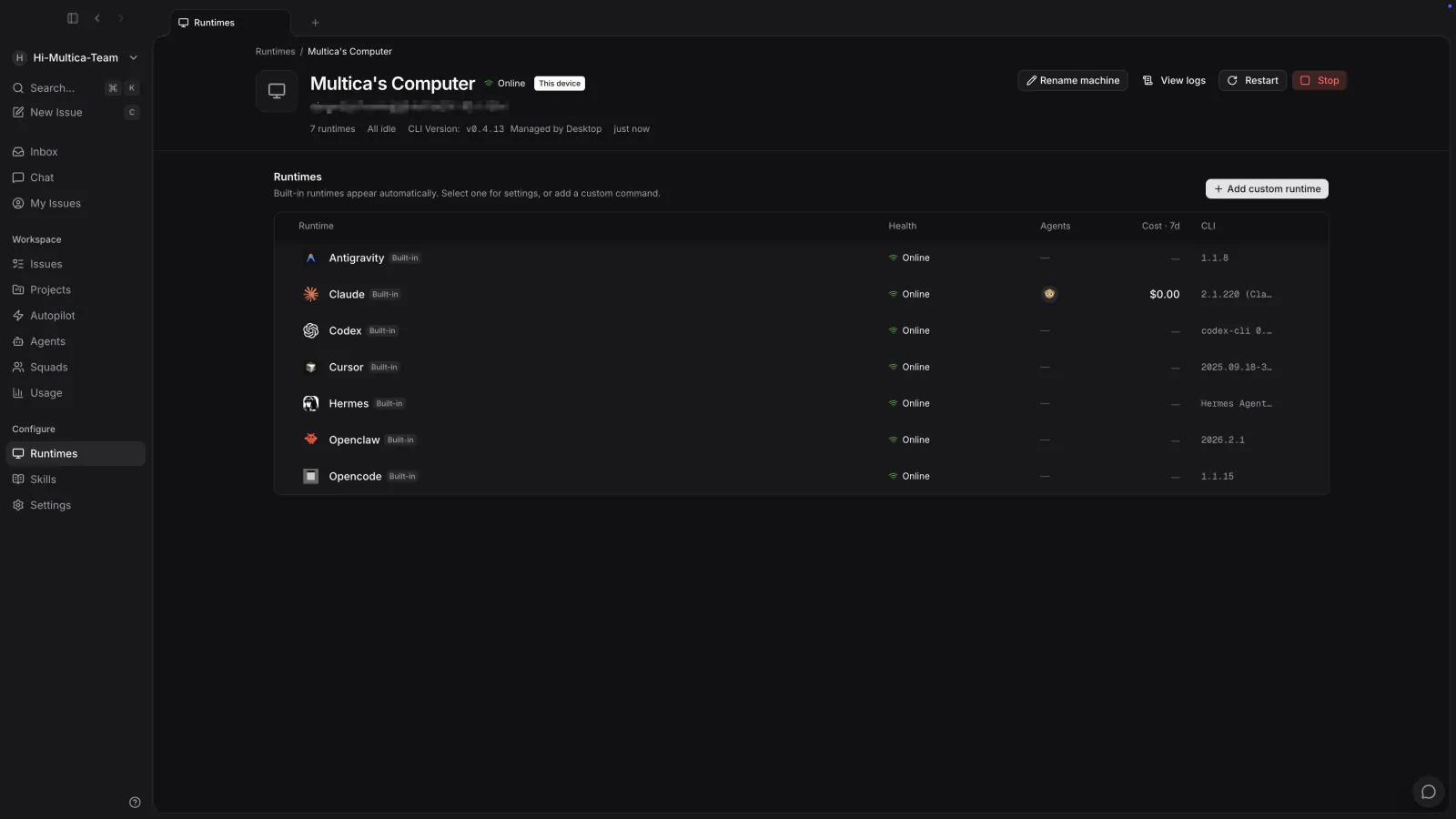
When a runtime is offline:
- Runs already queued wait for the runtime to recover. They fail only once it has stopped heartbeating for longer than the reconnect grace and the run has itself been queued that long, so a runtime that is merely busy keeps its backlog, and work assigned to an already-offline runtime still gets a full grace to wait.
- Runs that were in progress fail; eligible issue or chat runs can retry automatically.
- When the daemon starts again, it re-registers its runtimes and reclaims runs that did not end cleanly last time.
- A runtime offline for more than 7 days with no agents bound to it (including archived ones) is cleaned up automatically.
Detailed states and retry rules are in Runs.
Concurrency limits
One daemon executes at most 20 runs at a time by default; each agent at most 6. Effective concurrency is the smaller of the two.
Once a limit is reached, new runs keep queueing. You can adjust a single agent's concurrency in the agent settings, and the machine-wide cap through MULTICA_DAEMON_MAX_CONCURRENT_TASKS. Parallel runs compete for machine capacity, tool account quota, and the same working directory all at once.
Runtime sharing
A local runtime is private by default: only the runtime owner can create agents on it. Workspace owners and admins are no exception — the runtime is someone else's computer, and running an agent there spends their machine and their tool credentials.
Only the runtime owner can make it public — workspace admins can rename or delete a runtime, but sharing one is the owner's decision. Other workspace members can then select this runtime as well; that does not share the underlying AI coding tool's login credentials — it only lets members route their agents' runs to this computer.
To share with selected people, open the runtime's detail page, select Specific members, choose one or more workspace members, and Save. Those members can select the runtime and create agents on it. Only its owner can change the recipient list; recipients do not gain permission to rename, delete, or administer the runtime.
When the owner removes members, limits a public runtime to specific members, or makes it private again, Multica shows the affected agents and active runs, including Agent Builder sessions, before applying the change. Confirmation unbinds those teammates' agents, cancels their queued, dispatched, running, local-directory-waiting and deferred runs with runtime_access_revoked, and pauses active autopilots assigned to the unbound agents. Agents and runs belonging to the owner or members who retain access are unaffected. A changed plan requires renewed confirmation; concurrent chat writes may require a retry. To resume work, bind the agent to an accessible runtime, then explicitly resume its paused autopilots.
Cancellation preserves chat history and stores draft/attachment recovery data on the server. Web and desktop use the existing draft recovery UI; mobile does not yet expose that recovery UI. A started turn with no output waits for the daemon's cancellation acknowledgement or the server's finalize grace period before deciding whether to restore the input. A connected daemon observes cancellation through its regular check. If the computer is offline, server-side access is still revoked immediately, but the local process may continue until it receives cancellation after reconnecting; the server cannot guarantee an immediate remote stop.
Custom runtime profiles
If your team uses an internal wrapper, a version-pinned executable, or needs fixed extra arguments for a compatible tool, create a custom runtime profile.
A custom profile does not add a new communication protocol. You still pick one of the protocol families Multica already supports (the tool's integration protocol type; see AI coding tools comparison), and the command itself must be compatible with that family.
Task runtime environment
When the daemon starts an agent task, it injects task context into the runtime process. These values are owned by the daemon: an agent's custom environment cannot override any MULTICA_ variable or the task temporary-directory variables.
The table lists the variables that custom runtimes can use today. It is intentionally not exhaustive and is not a versioned API surface. Build integrations only on the five variables marked integration contract; treat the rest as informational details that may change.
| Variable | Value in a task | Stability |
|---|---|---|
MULTICA_TOKEN | Task-scoped mat_ API credential | Integration contract |
MULTICA_TASK_ID | ID of the active task | Integration contract |
MULTICA_AGENT_ID | ID of the assigned agent | Integration contract |
MULTICA_WORKSPACE_ID | ID of the task's workspace | Integration contract |
MULTICA_SERVER_URL | Multica server URL selected by the daemon | Integration contract |
MULTICA_TASK_CONFIG_ROOT | Private task-local Multica CLI configuration root | Informational |
MULTICA_TASK_WORKSPACES_ROOT | Root of the daemon-managed task workspaces | Informational |
MULTICA_AGENT_NAME | Display name of the assigned agent | Informational |
MULTICA_DAEMON_PORT | Local daemon health/API port used by task-only commands such as multica repo checkout | Informational |
MULTICA_TASK_SLOT | Slot in the daemon-wide concurrency pool; useful for slot-indexed resources such as GPUs | Informational |
TMPDIR | Private temporary directory for the active task; also supplied as TMP and TEMP except on Windows, where tasks inherit the user's temp paths for Git Bash's shared /tmp; Windows Claude Code defaults CLAUDE_CODE_TMPDIR to the task temp directory | Informational |
The server determines authorship for requests made with MULTICA_TOKEN; writes such as issue comments are attributed to the assigned agent and active task. For the token's complete binding, permissions, attribution, 24-hour maximum lifetime, and cleanup behavior, see Temporary tokens for agent runs.
These values live in the runtime process's real environment. Any child process the runtime starts inherits all of them by default, including MULTICA_TOKEN. If a child should not hold the credential, strip it explicitly; do not rely on process isolation that is not there. The exception runs the other way: tools that filter their own subprocess environment may require an explicit allow rule. For example, Codex's shell tool drops names containing TOKEN, KEY, or SECRET, so the daemon installs a managed shell policy that allows the required task variables. Keep the token in process environments only—never in a prompt, log, repository file, or persistent configuration. A child shares the parent task's identity and permissions; it does not receive a new, independently scoped identity.
Creating a profile
Only workspace owners and admins can create, edit, or delete custom runtime profiles:
- Open Runtimes and go to a computer where the command is installed.
- Click Add custom runtime.
- Choose the protocol family the command is actually compatible with.
- Fill in the name, command, and fixed arguments, then save.
The profile is shared across the workspace. Each connected computer looks up the command on its own; only computers that can resolve it on PATH register the corresponding runtime. Creating a profile does not install the command, and it does not sign other members in to the tool.
The command field takes an executable and arguments, not a shell script. Plain arguments, quotes, and backslash escapes work; pipes, redirects, &&, ;, backticks, and environment variable expansion do not. When you need those behaviors, put them in a wrapper script and use that script as the command.
How your arguments are ordered
Everything you type in the command field stays directly after the executable, ahead of the arguments Multica adds:
<your command> <your fixed arguments> <Multica's protocol arguments> <the agent's custom arguments>This is what makes a subcommand-style wrapper work. If your command is ccms start q36, the tool sees start q36 first and can select its subcommand before Multica's -p and the rest arrive — which is the only order such a wrapper accepts.
Your arguments used to be appended last instead. Most flag-style commands parse the same either way, but not all of them do — a command that distinguishes global flags from subcommand flags can care where a flag sits. If you already have a profile with fixed arguments, start one run on it after upgrading to confirm it still works.
Two more consequences worth knowing:
- Multica's own values win a conflict. If your fixed arguments set a flag Multica also sets, Multica's value comes later and takes effect. Most importantly, a model chosen on the agent overrides a
--modelpinned in the profile. To pin a model for everyone, leave the agents' model field empty. - Protocol-critical flags are ignored.
-p,--output-format,--input-format,--permission-mode, and the equivalents for other families are dropped from your fixed arguments, because overriding them would break the daemon's connection to the tool. Subcommands and other positional arguments always pass through.
If a Desktop-launched daemon cannot find a command your terminal can run, set an absolute path for the current computer:
multica runtime profile set-path <profile-id> --path /absolute/path/to/commandRemove the path override:
multica runtime profile unset-path <profile-id>Editing a profile only affects runs claimed afterwards. Before deleting a profile, deal with the active agents still bound to its runtimes. Deleting only the runtime instance on one computer does not delete the profile — a running daemon will re-register it.
Troubleshooting an offline runtime
Check in this order:
- Run
multica daemon statusto confirm the daemon is running. - Run
multica daemon logs -fto look for login, network, or tool-detection errors. - Run
command -v <tool-command>in the same environment to confirm the daemon can find it. - Open Multica's Runtimes page and check whether the target computer and the matching AI coding tool show as online.
- After a tool install, a path change, or a profile update, run
multica daemon restart.
If the problem persists, see Troubleshooting.
Next steps
- Install AI coding tools — install and verify a supported AI coding tool.
- AI coding tools comparison — compare models, session resumption, MCP, and skill support.
- Runs — queueing, stopping, and retries.