Projects
Organize related issues with projects and give them a shared goal, plan, and execution context.
Projects organize work that takes multiple issues to finish — a product launch, a migration, or a feature delivered in stages.
Work that a single issue can describe does not need a project. Projects fit a group of work that shares a goal, needs its progress tracked together, or needs shared repositories and working directories.
Parts of a project
| Part | Purpose |
|---|---|
| Name, icon, and description | Goal, scope, and long-lived requirements; the description enters the execution context of agents working inside the project. |
| Status | planned, in_progress, paused, completed, or cancelled. |
| Priority | urgent, high, medium, low, or none. |
| Lead | A member or an agent — who coordinates the project. |
| Start and target dates | The project's planned time range. |
| Issues and progress | The work in the project and how much of it is finished. |
| Resources | Linked GitHub repositories or local directories on specific computers. |
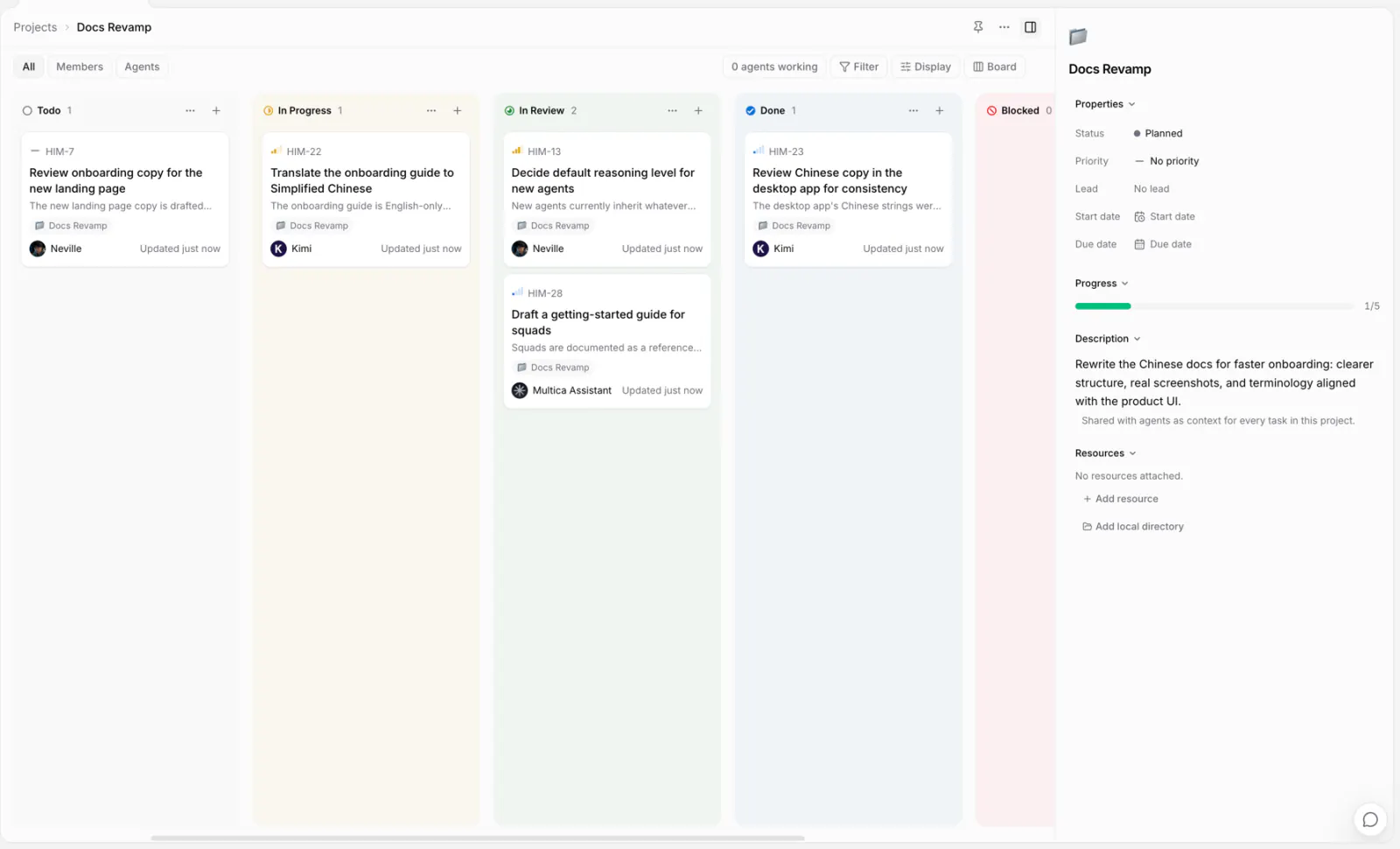
Projects and issues
A project can contain any number of issues; an issue belongs to at most one project. Create issues directly inside the project, or pick or change the project from the issue's properties.
Project progress is computed automatically from linked issues:
progress = issues in done or cancelled ÷ all issues in the projectcancelled means that work has been closed out of the project's scope, so it counts toward progress. Project status and issue status are independent: finishing every issue does not automatically set the project to completed, and changing the project's status does not bulk-change its issues.
Project description and execution context
When an agent runs an issue inside a project, the project's name and description are added to that run's context. The description is the place for information every related issue needs: the goal, technical boundaries, delivery conventions. Requirements that apply to only one issue belong in that issue.
Add resources
Project resources tell agents which code and working directories to use:
- GitHub repositories: provide a repo the runtime can check out, with an optional ref.
- Local directories: let the runtime on a specific computer work in an existing directory, whose contents the agent modifies directly.
See Project resources for how to choose and for the safety boundaries.
Project lead
The lead can be a member or an agent, and marks who coordinates the project. It is not a permission setting: it does not auto-assign the project's issues, and making an agent the lead does not automatically run it. Starting a run still takes an issue assignment, an @mention, or an automation trigger.
Pin to the sidebar
A pinned project appears in your sidebar. Pinning is a personal preference and does not affect other members.
Create, edit, and delete
Any workspace member can create and edit projects; only owner and admin can delete them.
Deleting a project does not delete its issues: they detach and stay in the workspace. The project's description, status, and resources are permanently deleted.
Next steps
- Project resources — link GitHub repositories or local directories.
- Issues — create and organize the concrete work in a project.
- Agents — learn about agent identity, configuration, and Access.